RaspberryPi+Node.js+Reactで赤外線リモコンをつくろう(2/2)
目次
※この記事は前の記事の続きです。
RaspberryPi+Node.js+Reactで赤外線リモコンをつくろう(1/2)
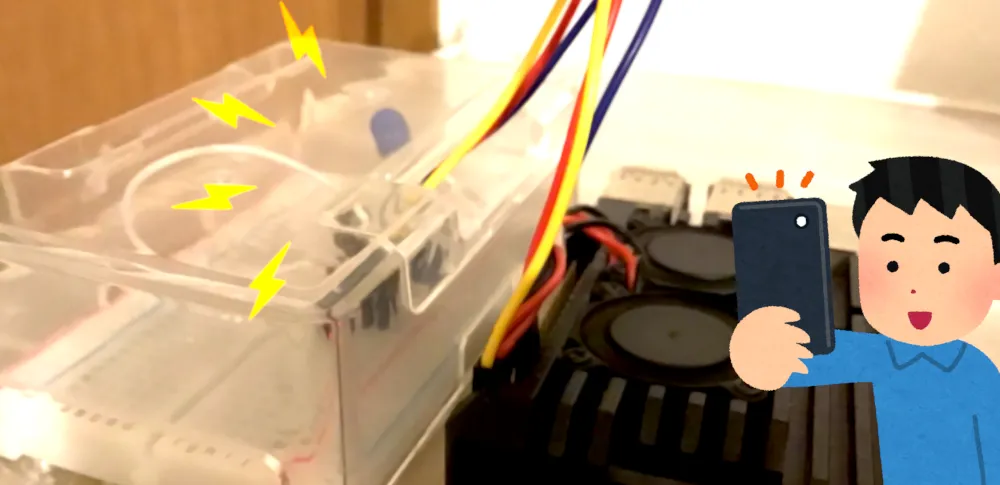
Reactアプリ
ここからは、スマホやタブレットから簡単に赤外線発信させるためのwebアプリを使っていきます。 ちなみにReactで実装する必要性はないので、Vue.jsなりAngularなり得意なフレームワークで書いた方が良いかもです。
↓実際のReactアプリ画面(自分用に改良したバージョンの画面の為、GitHubのソースと異なる部分があります)
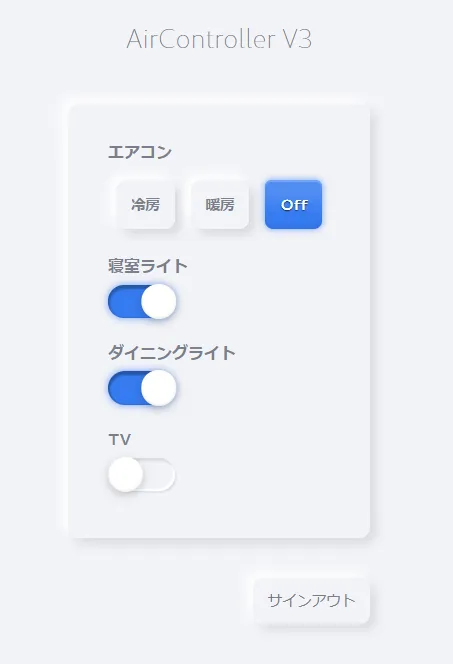
せっかくなのでニューモーフィズムなデザインにしてますが、ここら辺はお好みです。お好きなライブラリを使ったりして装飾しちゃいましょう!
Reactアプリは以下のGitHubのソースのDLを前提に説明しますので、一旦ローカルにDLしておきます。
https://github.com/TansanMilMil/webcon-react
React側でやることは大まかに以下の処理です。
- 画面表示時にRealtime Databaseから家電の状態を取得し、画面に反映させる。
- 家電のボタンを押したら、押した内容をRealtimeDatabaseに反映させる。
前記事で作ったNode.jsサーバは、常時Realtime Databaseを監視しますので、webアプリのボタンを押すことで、結果として赤外線発信までの一連の操作が実行されるようになります。
Firebase Hostingを使うための準備
公式の手順に沿ってアプリをCLIからデプロイできる状態にしておきます。
https://firebase.google.com/docs/hosting/quickstart?hl=ja
Firebaseの環境変数用ファイルを作成
touch env.js# env.js
var firebaseConfig = {
apiKey: "************",
authDomain: "************",
databaseURL: "************",
projectId: "************",
storageBucket: "************",
messagingSenderId: "************",
};Realtime Databaseを操作する
画面のボタンを押したら、RealtimeDatabaseの各家電の値を更新させるようにします。 記述内容は前記事で作ったNode.jsサーバで監視する値と連動するように適宜修正してください。
// Main.tsx
import * as React from 'react';
import './Main.scss';
import AuthProvider from '../../contexts/auth/AuthProvider';
import { FirebaseManager } from '../../contexts/auth/firebase';

interface Props {
  history: any;
}
interface State {
  isLoadingPowerRef: boolean;
  isLoadingBedroomLightRef: boolean;
  isLoadingDiningLightRef: boolean;
  isLoadingTvRef: boolean;
  powerRefCool: boolean;
  powerRefHot: boolean;
  powerRefOff: boolean;
  bedroomLightRef: boolean;
  diningLightRef: boolean;
  tvRef: boolean;
}
class AirconStatus {
  public static Cool = 'cool';
  public static Hot = 'hot';
  public static Off = 'off';
}
class LightStatus {
  public static On = 'on';
  public static Off = 'off';
}

class Main extends React.Component<Props, State> {
  database: firebase.database.Reference;
  powerRef: firebase.database.Reference;
  bedroomLightRef: firebase.database.Reference;
  diningLightRef: firebase.database.Reference;
  tvRef: firebase.database.Reference;

  constructor(props: any) {
    super(props);
    this.state = {
      isLoadingPowerRef: true,
      isLoadingBedroomLightRef: true,
      isLoadingDiningLightRef: true,
      isLoadingTvRef: true,
      powerRefCool: false,
      powerRefHot: false,
      powerRefOff: true,
      bedroomLightRef: false,
      diningLightRef: false,
      tvRef: false,
    };
    this.database = FirebaseManager.app.databaseRef;
    this.powerRef = this.database.child('airconPower');
    this.bedroomLightRef = this.database.child('bedroomLight');
    this.diningLightRef = this.database.child('diningLight');
    this.tvRef = this.database.child('tv');
  }

  componentDidMount() {
    this.setDbListener();
  }

  private setDbListener() {
    this.powerRef.on("value", (snapshot) => {
      if (this.state.isLoadingPowerRef) { this.setState({isLoadingPowerRef: false}); }
      switch (snapshot.val()) {
        case 'cool':
          this.setState({
            powerRefCool: true,
            powerRefHot: false,
            powerRefOff: false,
          });
          break;
        case 'hot':
          this.setState({
            powerRefCool: false,
            powerRefHot: true,
            powerRefOff: false,
          });
          break;
        default:
          this.setState({
            powerRefCool: false,
            powerRefHot: false,
            powerRefOff: true,
          });
          break;
      }
    });

    this.bedroomLightRef.on("value", (snapshot) => {
      if (this.state.isLoadingBedroomLightRef) { this.setState({isLoadingBedroomLightRef: false}); }
      switch (snapshot.val()) {
        case 'on':
          this.setState({bedroomLightRef: true});
          break;
        default:
          this.setState({bedroomLightRef: false});
          break;
      }
    });

    this.diningLightRef.on("value", (snapshot) => {
      if (this.state.isLoadingDiningLightRef) { this.setState({isLoadingDiningLightRef: false}); }
      switch (snapshot.val()) {
        case 'on':
          this.setState({diningLightRef: true});
          break;
        default:
          this.setState({diningLightRef: false});
          break;
      }
    });

    this.tvRef.on("value", (snapshot) => {
      if (this.state.isLoadingTvRef) { this.setState({isLoadingTvRef: false}); }
      switch (snapshot.val()) {
        case 'on':
          this.setState({tvRef: true});
          break;
        default:
          this.setState({tvRef: false});
          break;
      }
    });
  }

  private changeAircon(changeVal: string, e: React.MouseEvent) {
    this.database.update({airconPower: changeVal});
  }

  private changeBedroomLight(e: React.MouseEvent) {
    console.log(!!this.state.bedroomLightRef);
    if (this.state.bedroomLightRef) {
      this.database.update({bedroomLight: LightStatus.Off});
    } else {
      this.database.update({bedroomLight: LightStatus.On});
    }
  }

  private changeDiningLight(e: React.MouseEvent) {
    console.log(!!this.state.diningLightRef);
    if (this.state.diningLightRef) {
      this.database.update({diningLight: LightStatus.Off});
    } else {
      this.database.update({diningLight: LightStatus.On});
    }
  }

  private changeTv(e: React.MouseEvent) {
    console.log(!!this.state.tvRef);
    if (this.state.tvRef) {
      this.database.update({tv: LightStatus.Off});
    } else {
      this.database.update({tv: LightStatus.On});
    }
  }

  private signOut(e: React.FormEvent) {
    e.preventDefault();
    FirebaseManager.app.signOutAsync()
    .then(ok => {
      this.props.history.push('/signin');
    })
    .catch(err => console.log(err));
  };

  render() {
    const loadingSpinner =
      <div className="spinner-border text-info m-3" role="status">
        <span className="sr-only">Loading...</span>
      </div>

    return (
      <AuthProvider history={this.props.history}>
        <h4 className="text-center">Webcon</h4>

        <section className="setting-box-wrap">
          <div className="setting-box">
            <div className="paper pt-4 pb-5 pl-5 pr-5">
              <h6 className="text-left mb-2 ml-0">エアコン</h6>
              {this.state.isLoadingPowerRef && loadingSpinner}
              {!this.state.isLoadingPowerRef &&
                <div className="d-flex justify-content-start">
                    <label className="checktext">
                      <input type="radio" name="aircon-btn" checked={this.state.powerRefCool} readOnly
                          onClick={(e) => this.changeAircon(AirconStatus.Cool, e)}/>
                      <span>冷房</span>
                    </label>
                    <label className="checktext">
                      <input type="radio" name="aircon-btn" checked={this.state.powerRefHot} readOnly onClick={(e) => this.changeAircon(AirconStatus.Hot, e)}/>
                      <span>暖房</span>
                    </label>
                    <label className="checktext">
                      <input type="radio" name="aircon-btn" checked={this.state.powerRefOff} readOnly onClick={(e) => this.changeAircon(AirconStatus.Off, e)}/>
                      <span>Off</span>
                    </label>
                </div>
              }

              <h6 className="text-left mb-2 ml-0">寝室ライト</h6>
              {this.state.isLoadingBedroomLightRef && loadingSpinner}
              {!this.state.isLoadingBedroomLightRef &&
                <div className="d-flex justify-content-start">
                  <label className="switch">
                      <input type="checkbox" name="bedroom-light" checked={this.state.bedroomLightRef} readOnly onClick={(e) => this.changeBedroomLight(e)}/>
                      <div></div>
                  </label>
                </div>
              }

              <h6 className="text-left mb-2 ml-0">ダイニングライト</h6>
              {this.state.isLoadingDiningLightRef && loadingSpinner}
              {!this.state.isLoadingDiningLightRef &&
                <div className="d-flex justify-content-start">
                  <label className="switch">
                      <input type="checkbox" name="dining-light" checked={this.state.diningLightRef} readOnly onClick={(e) => this.changeDiningLight(e)}/>
                      <div></div>
                  </label>
                </div>
              }

              <h6 className="text-left mb-2 ml-0">TV</h6>
              {this.state.isLoadingTvRef && loadingSpinner}
              {!this.state.isLoadingTvRef &&
                <div className="d-flex justify-content-start">
                  <label className="switch">
                      <input type="checkbox" name="tv" checked={this.state.tvRef} readOnly onClick={(e) => this.changeTv(e)}/>
                      <div></div>
                  </label>
                </div>
              }
            </div>

            <div className="text-right mt-5">
              <button onClick={(e) => {this.signOut(e)}}>サインアウト</button>
            </div>
          </div>
        </section>
      </AuthProvider>
    );
  }
}

export default Main;
ソースが書けたら、Reactをデバッグしてみます。 ボタンを押すと、若干のラグがあった後に家電が動くはずです。
※デバッグ前にラズパイでNode.jsサーバを常時立ち上げておいて下さい。
ログイン画面を付ける
ログイン画面と認証機能を実装して、外部から他人が触れないように制御をしておきます。 不特定多数が閲覧できるインターネット上に公開する場合はあった方が良いです。 認証の実装にはFirebaseのAuthenticateを使うとサクサク作れますので便利です。(詳細は公式を参照下さい)
https://firebase.google.com/docs/auth?hl=ja
Firebaseへアプリをデプロイ
FirebaseHostingでインターネット上に公開します。
firebase deploy自分のスマホ等でwebアプリを開いてみて、動作確認できれば完成です! 帰宅中の電車内等で予め冷えたお部屋の暖房をONにしておくと、QOLの向上が実感できますよ。 お疲れ様でした。
余談
ラズパイはcrontabが使えますので、予め赤外線発信をさせるプログラムを用意しておいて、特定の時間になったら実行させることで、自動化ができます。 私は毎朝目覚ましと同時にラズパイで寝室ライトを自動ONになるように設定してますが、二度寝の頻度はかなり下がったと思います。
課題
- foreverで動かしているNode.jsサーバがごく稀に落ちることがあった。原因不明…。
- 夏場などはラズパイが高温になるので、ファン付きのラズパイ専用ケースがあった方が良い。(今は「Armor Case for Pi」というファン付きのケースをAmazonでポチって使ってます。)
- 使用した赤外線LEDは、通常の家電リモコンほど馬力がないようで、ある程度家電本体に近い場所に配置しないと、反応したり、しなかったり…ということもあった。赤外線LEDの向きは家電の方向に向けた方が反応が良かった。
- 手動で照明を操作してしまうと、RealtimeDatabaseの家電の状態と現実の状態が一致しなくなるので、基本的に手動で操作しない運用を求められてしまう。
また暇があれば改善していきたいところです。